I must admit that I really enjoyed all of the discovery exercises that were offered in Learning 2.0. The Technology Summit pumped me up to dive into the program. Self-paced learning is one of the hallmarks of a library. Now that I've completed PLCMC's 23 I'll go over to Stephen Abram's 43 things and explore what he mentions.
Everyone I've spoken with really seemed to enjoy adding avatars to their blogs. Whether they used Yahoo! Avatars or Meez.com it was a hit with everyone. This carried over to the Librarian Trading Cards mentioned as part of Thing #6 Flickr 3rd Party Tools.
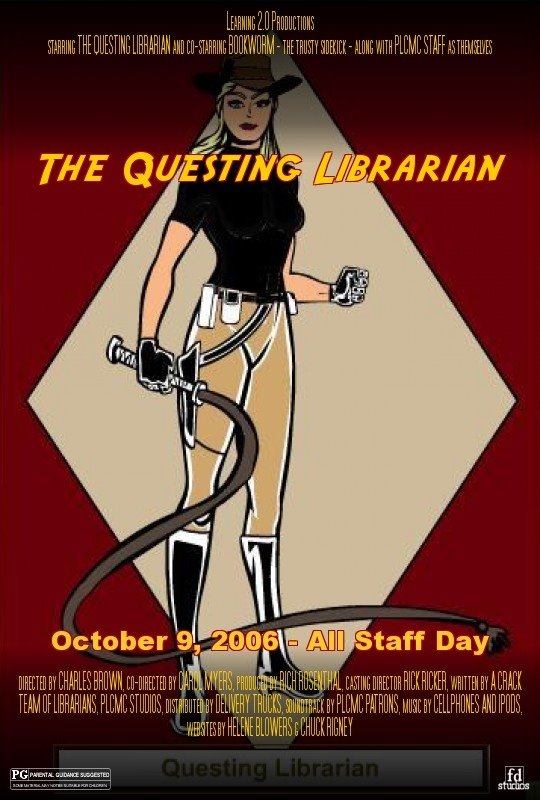
With Thing #10 Image Generators I got to bring my Librarian Action Hero to life with movie poster! I can see that others enjoyed them too based on the latest entry in Learning 2.0 - The L2 Image Slideshow. I know that many enjoyed Thing # 20 You Tube, Thing #21 Podcasting and Thing #22 Netlibrary but there wasn't as much making them "your own expression" as with the others mentioned.
Now I'd like to take that "avatar happiness" and hopefully apply it to the next generation of Library 2.0 and 3D Online Reference. A personal creative outlet meets service where the patrons are! And with my sharable customized start pages that I discovered as part of Thing #19 Web 2.0 tools I can keep track of all of these cool Learning 2.0 "things" in one place. Keeping track of these tools easily is the key to using them for resources and projects.
One thing that I would like to mention is that in order to complete each of the "23 Things" I found myself exploring while I was at work but posting my blog entries while I was at home so I wouldn't be distracted. For those staff that do not have computers at home, finding time to complete each of the entries was very much a challenge. I was especially concerned for the circulation staff because the majority of the circulation workstations to not have access to the open Internet, only sites on the PLCMC "yes" list through the proxy server.
If we did the project all over I would recommend that we:
1-Allow more time to complete the "23 Things". Some staff I spoke with lost their motivation to complete the project when they fell behind.
2-Put all the websites we are going to explore on the proxy server "yes" list so that circulation staff can access them from their workstations or have open Internet available on those workstations for the duration of the program.
3-Consider offering workshops for the "23 things". Even though some staff thrive on self-paced learning, others prefer workshops where they feel comfortable asking an instructor questions. Some staff felt uncomfortable asking others for help because they didn't want to prevent the helpers from completing their "things" too. Having a classroom setting lets a staff member step away from the day-to-day tasks and be able to focus on learning in an undistracted environment.
At my branch I felt these elements were there but I also want to say that everyone was very encouraging to each other. Anytime someone had a question there were mentors who were there to help. We all shared our successes and urged each other to continue so they could receive their MP3 player too!
If there was ever an incentive program like this in the future I know that I would probably participate. I'm sure the motivation from Learning 2.0 will inspire many other projects for some time to come. Now that we know about so many collabration tools it will hopefully make our jobs easier by not having to recreate the wheel everytime for resources and programming ideas but learn from others who shared through these Web 2.0 Tools.
Now I can go and read and comment on what other participants are saying and do a little sprucing up on my own little blog. :)
Thursday, October 05, 2006
#23 Comments on Learning 2.0
Posted by Anonymous at 12:43 PM 8 comments
Labels: 3D Reference, Avatars, Image Generators, Librarian Action Hero, Librarian Trading Card, Library 2.0, Netlibrary, PLCMCL2, Podcasting, Start Pages, Web 2.0, YouTube
Thursday, September 14, 2006
#15 Library 2.0 - More Than Teen Gaming Night
There are several Web 2.0 technologies that I can see libraries incorporating with a little help from their vendors. If vendors deceide to not offer them they should at least make their products to where the library itself can add these features. For the library catalog these technology features include: built-in RSS feeds for keyword searches and popular groupings such as new feature films, user tagging with outdisrupting the original subject headers on the collection, and the ability for user commenting and ratings on books and articles. Comments and tags one patron adds will help the next one looking for the same topic. Library vendors could also adopt the features of Amazon.com and Google of interest to patrons. You could have personalized catalog logins where patrons can add these features to their "My Library Catalog". Give them a place to list their favorite titles, authors and genres and be able to share it with others. Library users should be able to use these resources inside or outside the library.
A great example is the Endeca-based NC State catalog. I got a chance to hear about it from from a presentation by Andrew Pace, Head of Systems at NCSU at the Spring 2006 ANCHASL Meeting.They took their old Dynix catalog and dumped it into Endeca. Endeca offers the ability to choose from numerous ways to navigate. It offers reference linking and next generation multisearch. You can limit by document type or browse the the entire collection by call number. It has an automatic citation builder that is available in various styles. It even has automatic spell check similar to Google's "did you mean this" feature. Librarians can create a Q&A on the fly and add to the library FAQ.
If the library offers in-house resources such as websites then these could also have RSS feeds, user access points for the submission of reviews, assignment of keywords (“tagging”), addition of scholarly commentary, and other forms of user participation. A good example of this is the Reader's Club website.
Also the library will want to plan content for the new communication services that are available today. These include: graphics tablets, Ipods & MP3 players, smart phones, PDA's, E-book readers, smart watches, and Blackberries. Patrons will get excited if you have content for their new gadget. Incorporating Web 2.0 technologies in the library will help provide content for these devices. Examples of how libraries are using Web 2.0 tools that I've read about include:
-a public information blog for library news, events & discussion of community needs
-a story-time Podcast for younger patrons
-using Flickr to photoshare library events
-creating a Wiki-style town history where residents can browse a list of historic homes and adding their memories to the public record with a simple Web form
-wikis for genealogists
-wikis for local information
-wikis to pool library information and standards
-blogs for internal library communication--library managers blog, reference blog, branch blog, circulation blog, library teams blog, IT communications with library staff blog, etc.
-An internal library PC and server inventory wiki.
-Voice and Video over IP for digital meetings when travel is difficult
-pushing content via RSS
-content creation resouces for patrons to record podcasts and develop digital videos
-interlibrary loan (ILL) purchase-on-demand from online used-book retailers
-open source wiki software to create a successful subject guide that facilitates customer feedback
-personalization of library web pages
-allowing customers to call impromptu book talks or discussion groups
-offering collaborative online MS Office alternative resources such as Writely and Writeboard, 37 Signals products - Basecamp, Backpack, and Ta-da Lists and Microsoft Office Live
-instant messaging reference services
-downloadable music, video, and audiobook services
-an iPod Shuffle loan program
-podcast of a teen band competition at the library
-podcasts for library classes and grand tours of the library
If we use Web 2.0 technology between library staff first and get comfortable with it then we can use it with our patrons and market the library.
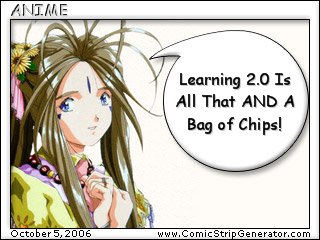
You might say, "Wow, Library 2.0 is is all that and a bag of chips but what about the future?"
I really enjoyed Dr. Wendy Schultz's article To a temporary place in time... the best out of the 5 perspectives in the OCLC Next Space Newsletter article Web 2.0 : Where will the next generation Web take libraries?. I think about what the the Joker said in Batman.."Think about the future, the future, the future..." It will transform and change us but also give us our special place where we can be in that fantasy zen zone for the mind--that place of wonder and exploration as a child--that we are all desperately trying to get back to when the world turned serious and growing up meant putting toys aside. I kind of equate it with moving from childrens resources with pictures and whizbang features like popups gizmos and textures to adult resources with boring text only. Yes it looks serious and authoritative. But who wants to read that? I'd much rather take the Japanese manga approch and have textbooks and manuals in picture format. They claim that learning is so much better. You absorb much more and the information is interesting. And that is really what we want. Information retrieval that is easy, pleasing to the eye, and facinating but with authority and expertise and a librarian guide to lead us to what we want with options--but not too many or we get information overload.
This librarian guide can be seen in person or online in 3D as an avatar in a virtual representation of the library. Each librarian has their subject specialties. When in a branch there is always one librarian that is the "go to" source for a particular topic be it scrapbooking or starting a business or travel tips. Patrons will collect trading cards on their favorite librarians and pass them on to other users. (Psst-Dude..check out this librarian...she pwns. Check her out if you need info on anything!)
But don't stop there! Create the library environment you have always wanted and integrate it with the virtual world. The virtual reality game Second Life has been host to many dual events online and live on location. Check out Jonathan Fildes article : BBC starts to rock online world. I can see the same thing happening in libraries. Library programming can be sent to the online game and show up on a video monitor for all avatars ingame to see. This would also be vice versa. If an event is going on in Second Life, all inside the library could see what is going on. Like satellite broadcasts of an event that has sold out in a stadium. Now those on the outside can see the show after all. No need to fight scalpers for tickets! Hmm..how about the Novello festival in Second Life?
And finally, make the library where you want to be in real life. Take a look at the OCLC Newsletter article Staying in the game! : How to create environments for Boomers and Gamers in your library especially the section Zone in on your users. People play virtual reality games to be in that fantasy zone where they want to live, create, and express themselves. Make it so in the library too. I want a library that partners with private vendors to offer a Starbucks Coffee/ Tea House type environment that everyone wants to be in. I want a community space thats buzzing with programming hipness and sound proof areas for quiet study to reach that "zen" state of lifelong learning. I want good natural lighting, plenty of windows, and comforable chairs. Take that zen feeling and make an enclosed Japanese style tea garden or an outdoor cafe. Have access to porches that open onto an arboretum with picnic benches and electrical outlets on the outside. I want all of that plus an information hub that is second to none. If I want to learn how to paint I can find it--online or with a guidebook and have access to digital tools to create on the spot. If I want to understand how DNA makes the world go round I should be able to find it at home, at work, or wherever I am. If the library doesn't have a book I want, I would like to walk over to a bookmaker machine, type in the ISBN and the machine prints it in 15 minutes--cataloged and ready to check out. Libraries can become the new star attraction that will put a city on the map. Make it something that every visitor will put on their "must see and do" list. Golden Gate Bridge, check, Broadway musical, check, Seattle Public Library, check, Salt Lake City Public Library, check...
So when are we going to have video games for checkout like Blockbuster? Patience young Padawan.
Posted by Anonymous at 2:09 PM 2 comments
Labels: 3D Reference, Avatars, Librarian Trading Card, Library 2.0, Lifelong Learning, PLCMCL2, RSS, Second Life, tags, Web 2.0
Sunday, August 27, 2006
#7 3-D Online Reference - 2nd Life, Google Earth & Other Musings
With all of this online communcation technology it will only be a matter of time before we start seeing 3-D library reference. 2-D reference like NCKnows/Questionpoint seems like online reference on steriods to librarians now, but 3-D reference will include an avatar for both librarian and patron. More and more businesses are creating a 3-D representation of themselves on the web. One of the most dynamic examples of that is in the online game Second Life. A virtual world that is completely created by the players themselves. The game developers just supply the servers and moderate the game. Everything else is done by the players. It costs nothing to download the software for the game onto your computer and create an account with your avatar. But if you want to buy land and put a building on it you will need to upgrade to a premium account which costs $9.95 a month.
Who is creating a virtual representation of themselves in Second Life? Some examples are: CBS News, Wells Fargo, and even Harvard Law School.
The article "Your Second Life is Ready" from the September 2006 issue of Popular Science says it best, "...if I was online banking in SL, I wouldn't have to browse through several static screens of text. I could just walk into a virtual bank, stroll up to a teller, and deposit real-life money the newfangled, old-fashioned way: by talking to a person." (Newitz, p. 76) Other examples of 3-D use include: touring a college campus before you visit in person or visiting virtually your vacation destination to get the best hotel in relation to what you want to do. Clothing stores are setting up shops where you can put your actual measurements on an avatar and try on clothes before you buy.
I know that other services will probably be next. Enter what OPAL and the Alliance Library System are doing with the Second Life Library 2.0 These folks are going where the patrons are. In April 2006 they put out a call for librarians interested in participating in a project to set up a library presence in Second Life. In less than a month, more than two dozen librarians from around the world were meeting at a brand new virtual library to staff the reference desk and discuss collection development, online programming, and library services. The response has only grown, and Second Life citizens are taking advantage of all the library has offer. Our very own Kelly C from ImaginOn is heading up the Virtual Teen Library : Second Life. Go Kelly! The nice thing about Second Life is that it will allow librarians to iron out the kinks of offering this sort of service and troubleshoot problems in a controlled environment.
Not to be outdone, enter Google Earth. This is a 3-D representation of planet Earth taken from satellite photos. Google also released recently a popular 3-D modeling program called SketchUp. Google developers are encouraging folks to use SketchUp to create 3-D layers on top of Google Earth.
In the article, Future Boy: Google moves into virtual worlds Chris Taylor from CNN/Money.com says, "The result could be that we'll soon populate a virtual version of planet Earth instead of the made-from-scratch metaverses like online games or Second Life. The main element Google Earth is missing today is avatars, but at least one observer believes those to be added soon."
A virtual earth..hmmm....something to ponder. Online reference in your PJ's?
Posted by Anonymous at 8:59 PM 1 comments
Labels: 3D Reference, PLCMCL2, Second Life