This discovery exercise has us looking at AllMyFaves and 43 Marks. 
I was really surprised to still see the logos for Washington Mutual, Wachovia, and UBS under the banks category because of the 2008 subprime mortgage crisis. I was also surprised to see Second Life in the chat category. I guess it could be called 3D chat. I haven't exactly thought of it that way but I guess it makes sense. I think that it is interesting that they include news readers like Bloglines in the Blogs category but don't include photo editors in the photo cateogory like Picnik. And where is Yahoo! Chat in the chat category? I thought they were the largest chat service. Has someone surpassed them? Also there is no Wired magazine in the Tech category. OK, I'm really starting to get concerned about this site listing the "best" sites in their respective categories. Maybe AllMyFaves is exactly that, the favorite sites of the developers.
I checked out LiveLeak in the video category and yes it is a video site that leaks video media to the public. I also took a look at Break.com and yes it was in the correct category (videos). It's theme is free videos, pictures and comedy for guys. 
I took a look at Propeller in the Info/Ads category. According to its decription: "Propeller is a social news portal, meaning that it is programmed by you — the audience. Our members post links to stories from all over the Web." Hmm, shouldn't it be in a social news category like Digg? 43Marks didn't have a news category. Then I took a look at Kijiji in the same Info/Ads category and this time yes it was classified correctly--it is a Free Local Classified Ad site.
I can see someone using AllMyFaves and 43Marks as a crash course introduction to Web 2.0. But depending on your tastes and style, you might find yourself moving on to other places to organize your social networking and newsfeed day.
Saturday, January 03, 2009
Thing 66: AllMyFaves & 43 Marks
Thursday, January 10, 2008
Thing 26: Widgets on YourMinis
Ok I spent wayyyy too much time on this one. I actually have tried several start pages in the past so I went back and reviewed them first and worked with the YourMinis startpage last. Some of the others I tried were: Netvibes, Pageflakes, iGoogle, MyYahoo!, and Protopage. This was a continuation for me of an earlier "thing" : #19 Web 2.0 Tools - Start pages : "Pimped Out" Personalized Home Pages. Each has their bright spots. MyYahoo and iGoogle have the bonus of being a part of a persons email account so you can link directly to other parts of your Yahoo or Google accounts easily. Netvibes, Pageflakes, iGoogle, MyYahoo and YourMinis have widgets by well known content providers. Protopage and YourMinis had unique widgets I hadn't seen before. Many will let you add your own custom made widget but you have to sign up for a widget developer account. There were many times that I wanted to add a widget from one site to another and each startpage had content providers they partnered with. Unfortunately if your startpage was not among the "preferred" providers it was very difficult to add it to your startpage. Many times I thought it wasn't worth it to try to go through the added steps transfer to another startpage's site. If you were adding the widget to your personal webpage or blog it was much easier. Just copy and paste the code like with other sites widgets.
With all of them you could customize them and drag and drop widgets where you liked on the page. Some more so than others. Protopage and Yourminis gave you the closest feeling of an open desktop with their dark backgrounds and ability to place the widget anywhere on the page, not just in a certain order. Protopage also gave the added bonus of letting you create multiple rows of tabs not just one row with a left/right arrow like with Yourminis. That way you could see all of your tabs in one glance.
I finally leaned towards the YourMinis startpage because of how their widgets interacted with sites that I already use and also for how the startpage was laid out and how the menus were laid out to add new widgets. I'll cover how I use the startpage by tabs.
Tab 1 - Productivity
Here I added the ususal suspects: calendar, weather, the web search widget, bookmark widgets of heavily used sites--its nice that they open in a separate tab or window (depending on what browser you have). I also added my avatars from Yahoo! and Meez and a wood elf picture linked directly from the web into a frame--nifty.
Tab 2 - Reference
I tend to scribble down notes on a little slip of paper and then would forget where I put it when I needed it. So I created a Reference tab and used the notepad and text editor widgets for little reference tidbits. There is even a widget called ScribePad that looks like you are typing on a little parchament scroll. These notes are especially handy when I do NCKnows online reference because I can access it from any browser on any computer under any login.
Tab 3 - Books to Read
LibraryThing covered in Thing 11 doesn't have a separate menu for books to read. I could add tags to my books called "ToRead" but I find that I use LibraryThing more for books I have already read. There is a site that has a separate "Books to Read List" called Shelfari. It's similar to LibraryThing but I haven't really looked into it to compare more than that. I do know that LibraryThing seems to have more users for what ever reason. Both are great tools for feedback for bookclubs. One of our children's librarians uses Shelfari for her bookclubs. Check our her blog at Stiletto Storytime. In the Yourminis startpage I've got my Amazon wish list widget there as well as search widgets for Amazon US and UK. I tried adding the library's catalog widget but it has to be a URL not HTML code. (Note to self--email Paul about having the catalog widget available as a URL) I even added the cover art widget where you can type in the title of a book, movie, or music cd and it will bring up the book cover. You can even search by keyword.
Tab 4 - Photos
I also created separate tabs for photos and videos. The Flickr widget is most awesome. If you have friends in your Flickr network, this is way cool to keep up with what they are adding. You can also do a search for a keyword in the Flickr widget and it will constantly update with the latest on that keyword. Of course I had to create ones with elves, fairies and shelties to test it out. If your friends use a different photosharing service you can use the Slide Show widget instead.
Tab 5 - Videos
You can do keyword video searches in You Tube or Veoh and it will retain that search for you to view each time you use your startpage. I found a video that had giant koi swimming in a pond to Japanese music. More soothing than a fish tank and no clean up!
Whew! After all of that...I still want to go back and look at NetVibes and see all the nifty content they have. That should take oh...another month. Ha Ha!
Thursday, October 05, 2006
#23 Comments on Learning 2.0
I must admit that I really enjoyed all of the discovery exercises that were offered in Learning 2.0. The Technology Summit pumped me up to dive into the program. Self-paced learning is one of the hallmarks of a library. Now that I've completed PLCMC's 23 I'll go over to Stephen Abram's 43 things and explore what he mentions.
Everyone I've spoken with really seemed to enjoy adding avatars to their blogs. Whether they used Yahoo! Avatars or Meez.com it was a hit with everyone. This carried over to the Librarian Trading Cards mentioned as part of Thing #6 Flickr 3rd Party Tools.
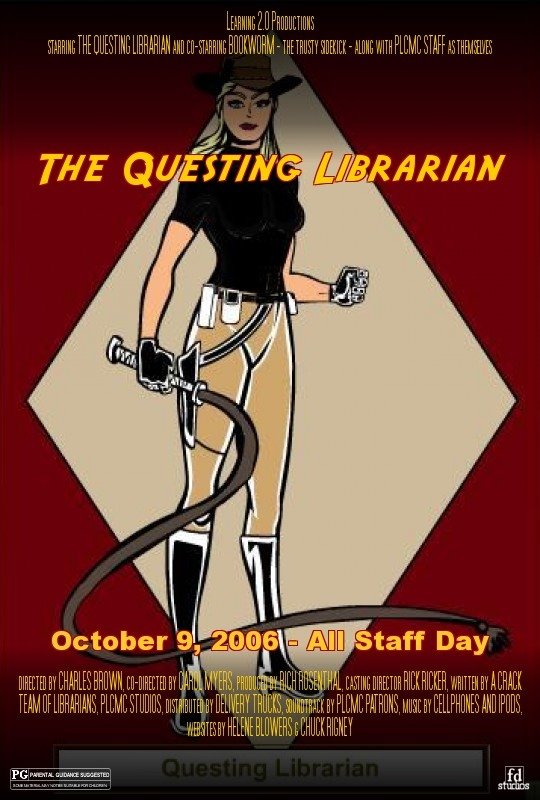
With Thing #10 Image Generators I got to bring my Librarian Action Hero to life with movie poster! I can see that others enjoyed them too based on the latest entry in Learning 2.0 - The L2 Image Slideshow. I know that many enjoyed Thing # 20 You Tube, Thing #21 Podcasting and Thing #22 Netlibrary but there wasn't as much making them "your own expression" as with the others mentioned.
Now I'd like to take that "avatar happiness" and hopefully apply it to the next generation of Library 2.0 and 3D Online Reference. A personal creative outlet meets service where the patrons are! And with my sharable customized start pages that I discovered as part of Thing #19 Web 2.0 tools I can keep track of all of these cool Learning 2.0 "things" in one place. Keeping track of these tools easily is the key to using them for resources and projects.
One thing that I would like to mention is that in order to complete each of the "23 Things" I found myself exploring while I was at work but posting my blog entries while I was at home so I wouldn't be distracted. For those staff that do not have computers at home, finding time to complete each of the entries was very much a challenge. I was especially concerned for the circulation staff because the majority of the circulation workstations to not have access to the open Internet, only sites on the PLCMC "yes" list through the proxy server.
If we did the project all over I would recommend that we:
1-Allow more time to complete the "23 Things". Some staff I spoke with lost their motivation to complete the project when they fell behind.
2-Put all the websites we are going to explore on the proxy server "yes" list so that circulation staff can access them from their workstations or have open Internet available on those workstations for the duration of the program.
3-Consider offering workshops for the "23 things". Even though some staff thrive on self-paced learning, others prefer workshops where they feel comfortable asking an instructor questions. Some staff felt uncomfortable asking others for help because they didn't want to prevent the helpers from completing their "things" too. Having a classroom setting lets a staff member step away from the day-to-day tasks and be able to focus on learning in an undistracted environment.
At my branch I felt these elements were there but I also want to say that everyone was very encouraging to each other. Anytime someone had a question there were mentors who were there to help. We all shared our successes and urged each other to continue so they could receive their MP3 player too!
If there was ever an incentive program like this in the future I know that I would probably participate. I'm sure the motivation from Learning 2.0 will inspire many other projects for some time to come. Now that we know about so many collabration tools it will hopefully make our jobs easier by not having to recreate the wheel everytime for resources and programming ideas but learn from others who shared through these Web 2.0 Tools.
Now I can go and read and comment on what other participants are saying and do a little sprucing up on my own little blog. :)
Wednesday, September 27, 2006
#19 Web 2.0 Tools - Start pages : "Pimped Out" Personalized Home Pages
It was very hard to just pick out "one" Web 2.0 Tool to talk about. I know that I didn't want to choose a tool similar to what we have already covered in the Learning 2.0 project so after looking at many types of resources I deceided that it would be best to look at start pages because it would be nice to have in one place all of these neat "things" we have been talking about. That way I can keep track of many more things that I could put in the sidebar of my blog. You could even create a separate library start page to help with reference questions or programming ideas if you wanted.
The three start page winners mentioned in the SEOmoz's Web 2.0 Awards grabbed my attention. I have been curious to know about what My Yahoo! alternatives were available. I was hard pressed to decide between the first two: Pageflakes.com and Google's Personalized Start Page.
Since I already have a Google account because of Blogger Beta I knew I had to try it out. Google's Content Directory is nicely separated out into category tabs for easy selection. It also lets you add your own modules or feeds. Nice. Although not as snazzy looking as Pageflakes, its ease of use was hard to beat.
Pageflakes has an AJAX start page which is more readable and easier on the eyes. It also has lots of feeds and "flakes" to populate your personal page with. It also organizes its content into categories but via drop down menus.
In both you could add your modules (pageflakes calls modules "flakes") or feeds and drag and drop them how ever you would like in you homepage layout. This is definately something that My Yahoo does not have. You can quicly add your own feed in both Pageflakes and the Google Start Page but Pageflakes doesn't have a way to let you add your own module yet. Google Start Page will let you add one via URL.
I probably use the Google Start Page for work related things and Pageflakes for personal stuff so that I can continue to monitor both for progress. I'm sure that at some point Pageflakes will let you add your own modules too. Overall start pages make a nice one stop shop for all of your personalized content.