

What started as a personal idea turned into a community building project that the IB community could be proud of. All of the Independence Regional Library staff along with volunteers, patrons, our local response area police officers and the teen band, Rinsen, contributed to make the video. Even though making a live action video was something new to me, it gave me the opportunity to learn by doing. I spent many hours of personal time shooting the environmental and vehicle clips, learning to use the video editing software and creating and editing the 30 second entry. It really was a team effort and it shows in the video.
The “director’s cut” of the video shows all of the participants and includes credits of everyone’s efforts both behind the scenes and in front of the camera.
When the entry was posted on the CBS website for voting, the sound seems to drop and the video stops 9 seconds before the end. So I posted it on YouTube so that voters could see the video the way it was sent in. rapierson posted the link in the comments section of the CBS site so that voters could see the full video without the technical difficulties.
To vote for this video in the contest go to: http://bit.ly/bV2GTR . Voting begins after 3PM EST on Thursday Sept. 16, 2010 until 3PM EST Sept. 23, 2010. This is for the top five videos. Return to the CBS link on Thursday, Sept. 23 after 3PM EST to vote for IB again. The winner will be announced on Thursday Sept. 30. You can vote more than once for the video. Just refresh the web browser and retype the word verification and vote. Every vote counts!
If Independence is fortunate and the public votes for IB’s video entry, the branch will receive an autographed surf board from the cast of the new Hawaii Five-0. We hope to put it in our recently dedicated teen area, now called “The Zone”. All participants will get their picture taken with the surf board as a thank you for participating in the project.
Wednesday, September 22, 2010
IB Enters Hawaii Five-0 Theme Song Contest
Tuesday, February 24, 2009
Thing 70 : MP3 Downloads That Are Legal & Free

After going through the 35 website suggestions mentioned in the discovery exercise, I narrowed it down to less than 10 that I would recommend to patrons. I eliminated them if they required any sort of software download or registration, others simply because I thought they were too difficult to navigate to find if there were songs available to download and what was available wasn't worth the effort of the search. Here are the cream of the crop that I thought were the least painful to use and have the most available for selection:
For Downloads to Listen To:
C|Net's Music.Download.Com
CNET has a very simple to use website for free music downloads. You can click on the link "111,052 Free MP3s" at the top of the web page and browse alphabetically. You can sort by artist name, song name, average rating, total listens, and others. Another way to search is to type the name of the artist or song you are looking for in the search box at the top to see if you get any hits. If there is a match, click on the link that says "see all free tracks". Then click on "download free MP3" to start downloading. You can play the song first to see if you want to download it. No registration required.
MP3.com
Mp3.com works with a wide array of musical artists. Click on the "Free Music" Tab and start browsing. You can sort the list by genre or by artist's name. Click "Play" to listen to the song first. Click on the "MP3" button and begin downloading when you're ready. Registration not required.
MP3Raid.com
MP3Raid is a search engine that locates MP3s on the internet. It offers the widest range of free music available. Just type in the artist or song you are looking for in the search box. You may need to rename the MP3 files that are downloaded but MP3Raid will walk you through what you need to do. Registration not required.
PureVolume
PureVolume says that it is a website for the discovery and promotion of new music and emerging artists. Artists have the option of making each of their songs available for free download. Type in the album, artist or song name you're looking for. Click on the link for the artist name. Songs will be listed in the playlist. Some are available only to listen to, others you can listen to and download. Click on the "download" button and begin your download. No registration required.
For Downloads to Use in Your Creations:
Jamendo
Creative Commons MP3s. New artists upload their albums under Creative Commons promote their work. You can play, share, and download the songs to listen to or to use in your own works.
CCMixter
Site dedicated to music that you can download to remix and post your results, all under the Creative Commons Attribution-Noncommerical 3.0 United States License. Click on the "Search" button to get started.
Don't forget that many artists will offer free downloads of a few songs and podcasts to promote their work. If you go to their website or Myspace page they will mention if that is something they do.
Sunday, January 25, 2009
Thing 56: Smilebox
 |
 |
| Make a Smilebox slideshow |
I'm backtracking a little bit this entry and picking up Thing 56 : Smilebox. I've been waiting for some of the books to come in on hold that we have done for bookclub to take pictures of. I didn't want to make any members nervous by taking pictures of them in bookclub so I opted to take pictures of the books instead--ha-ha! Smilebox is a small download and will probably fit easily on a flashdrive. There are tons if ideas for slideshows, ecards, scrapbooks, photo albums, and postcards. Plus they are always posting new templates constantly. Creating a presentation was easy. Smilebox is very similar to Scrapblog in Thing 29. It has an intuitive user interface to add photos from your camera, computer or online. Choose your template, add your photos, choose music or not. If you want to add your own music or select from the music selector you will have to pay for the premium design for $1.99 or pay a $5.99 monthly fee for unlimited use.
You can save your creation, email or post it on your blog or website for free. I emailed it to myself and at the bottom of the message received a URL link for it. I also added it to this blog entry easily. Just copy and paste the code into your blog post. Thanks Smilebox for new ways to jazz up your photos!
Friday, January 09, 2009
Thing 69: Feed My Inbox

Feed My Inbox would be good for someone who only has a few feeds to keep up with. But as with anything, time has a way of making a few feeds into a lot of feeds. So for me, I can't say that I would be using Feed My Inbox unless it is to make sure I don't miss an infrequent update in my Bloglines reader. After I received my first feed from Unshelved I promptly unsubscribed. I have way too many feeds to keep up with so a feed reader is much better for me. Also, by using a feed reader, you can avoid some spam that sometimes crops up from sending RSS feeds to your inbox.
As for recommentations to patrons, it would be on a case by case basis. Many websites already have a way for you to directly subscribe on their site. Still it is handy to know about as a back up.
Thursday, January 08, 2009
Thing 68: Filtering Flickr
This discovery exercise has us looking at two filtering sites for Flickr photos: flickrCC and Tag Galaxy.
I started with my favorite search term--fairies. I always love the whimsy and fun associated with these pictures. 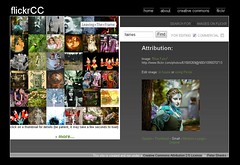 flickrCC - I was simply amazed by the amount of creative commons photos that were available for fairies. I liked that it had check boxes if you wanted photos for editing or for commercial use. It even has links for if you want to edit the photo inhouse or use Picnik. Also you can click on the size you want and it immediately gives you the URL so you can link to it in your blog, website, or presentation. And of course there is a link back to the Flickr page from which it comes from if you want to comment or add to your faves.
  Tag Galaxy - The visual appeal of Tag Galaxy is simply stunning. You enter your tag search and it gives you your tag as a main planet with smaller satellites orbiting your tag that are related. You can select any of these additional related tags to focus your search. Since there are many variations on how to spell fairies, singular and plural, I was glad that Tag Galaxy pulled these out for me automatically. I added: fairy, faerie, faery, and faeries. Very handy.
 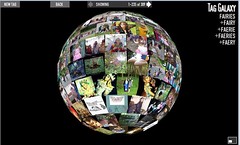 Then Tag Galaxy pulled together my search into a planet of 309 photos. It would have been nice if flickrCC told you how many hits you got on your tag search. In Tag Galaxy you could zoom in our out with your mouse wheel or show your results in fullscreen mode. You could rotate this planet of photos and select any photo from the sphere. One mouse click gets you a close up and title. Click again and you get the description as well as a link to the original Flickr page so you can get your URL for the photo. Click the "X" to go back to scanning the photos. Be careful about using these photos, they are not all limited to creative commons so you'll need click through to Flickr to be sure it is OK to use.
Then I did a second search to see if fans of the book Neverwhere by: Neil Gaiman had posted any creative commons photos that were inspired by the book. I wanted to spice up my slides for my book club quiz show. I used flickrCC and it brought up 31 creative commons photos. Then I went into Flickr's advanced search option and tried the same search--Neverwhere limited to creative commons photos. This brought up 70 hits. So there were some that may have been missed by flickrCC. Then I went to Tag Galaxy and did a search for Neverwhere. This brought up 96 hits, but since it does not have a way to limit to just creative commons photos I would not be able to use it to search for photos to use in projects.
Overall, both flickrCC and Tag Galaxy have their advantages. Even when you use the same tag in each they bring up a different set of photos to browse. I would tend to use Tag Galaxy for personal use and browsing and flickrCC for specific things and to search for photos for projects. I would also include an advanced search in Flickr itself for photos for projects. They both have a place in my toolbox. Thanks flickrCC and Tag Galaxy!
Sunday, January 04, 2009
Thing 67: Stress Savers
This discovery exercise has us exploring three sites: Dial-A-Human, CustomGuide, and UserNameCheck.com.  Dial-A-Human - Dial-A-Human gives you the exact number to press to avoid navigating nerve-wracking phone trees. This will certainly come in handy with several of our library patrons who seem to have a passion about contacting businesses--for all sorts of reasons. I am only afraid that if we offered this for one business and then another was not on the list, there would be disappointment--the expectation was there. The list is mainly for popular national entities. It looks like my phone company/DSL provider is on there but not my cable provider. They even have links to send a new number or report a bad number or broken link. A handy site to have in your reference toolbox.
 CustomGuide - CustomGuide offers great tipsheets on the most popular office software products. These will be very handy for both staff and patrons. It is expecially helpful because it offers multiple versions of products such as MSOffice. Now if I have a patron who needs a quick introduction to a software product the library has, I can print out a quick .pdf tipsheet. Thanks CustomGuide!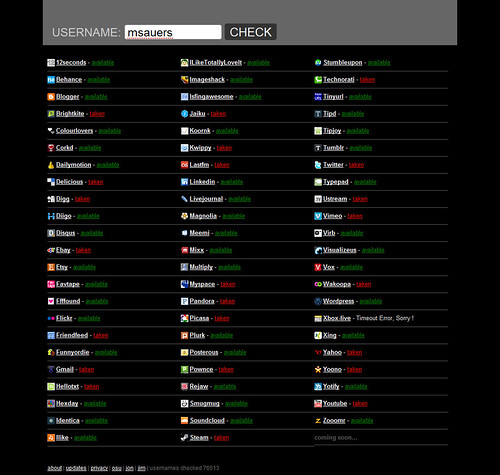
(Image courtesy of Travelin' Librarian.)
UserNameCheck - Usernamecheck lets you check many Web 2.0 sites to see if your favorite handle is already taken. I ran a check on my favorite username and was very happy to see that it was unique. However, Usernamecheck did think that my handle was being used on two sites that it was not. When I went directly to the sites, they could find no evidence of anyone using that username. Another little thing I noticed is that when you type in your handle to check, be sure to click on the "Check" button. Just pressing [Enter] on the keyboard will sometimes not make it run, or not run correctly. This site seems like it would be more of a novelty than a reference tool, but it was still fun to see it run the check.
Overall, I predict that I will be adding Dial-A-Human and CustomGuide to my reference toolbox. UserNameCheck is fun but I don't think I'll be using it very often. I have to have a reason to register on a site, I just can't see registering for everything to be sure that I have my favorite handle.
Saturday, January 03, 2009
Thing 66: AllMyFaves & 43 Marks
This discovery exercise has us looking at AllMyFaves and 43 Marks.  AllMyFaves has living breathing people selecting the best of the web and categorizing it for you, sort of like the early days of Yahoo or the DMOZ Open Directory Project with Google.
I was really surprised to still see the logos for Washington Mutual, Wachovia, and UBS under the banks category because of the 2008 subprime mortgage crisis. I was also surprised to see Second Life in the chat category. I guess it could be called 3D chat. I haven't exactly thought of it that way but I guess it makes sense. I think that it is interesting that they include news readers like Bloglines in the Blogs category but don't include photo editors in the photo cateogory like Picnik. And where is Yahoo! Chat in the chat category? I thought they were the largest chat service. Has someone surpassed them? Also there is no Wired magazine in the Tech category. OK, I'm really starting to get concerned about this site listing the "best" sites in their respective categories. Maybe AllMyFaves is exactly that, the favorite sites of the developers.
I checked out LiveLeak in the video category and yes it is a video site that leaks video media to the public. I also took a look at Break.com and yes it was in the correct category (videos). It's theme is free videos, pictures and comedy for guys.  Then I signed up at 43 Marks to take a look at their start page. It seems like everyone is getting on the start page band wagon. My favorite start page was a part of YourMinis, which they have shut down but still offer widgets to put on other start pages, websites and blogs. We talked about widgets in Thing 26. After YourMinis closed their startpage I moved to Netvibes. I based this on popularity and also it was rated #1 in the 2008 Seomoz Web 2.0 Awards. The organization of 43 Marks is very clean and simple. Simplicity and ease of use are good traits to have. But the layout of the site I think is better for someone who has only a few bookmarks to keep up with, not the 773 like I have on Delicious.com. Also someone who likes the clean lines of Facebook, Google, or BookJetty might also enjoy 43Marks.
I took a look at Propeller in the Info/Ads category. According to its decription: "Propeller is a social news portal, meaning that it is programmed by you — the audience. Our members post links to stories from all over the Web." Hmm, shouldn't it be in a social news category like Digg? 43Marks didn't have a news category. Then I took a look at Kijiji in the same Info/Ads category and this time yes it was classified correctly--it is a Free Local Classified Ad site.
I can see someone using AllMyFaves and 43Marks as a crash course introduction to Web 2.0. But depending on your tastes and style, you might find yourself moving on to other places to organize your social networking and newsfeed day.
Friday, January 02, 2009
Thing 65: Greed Is Not Good

Well the Subprime Mortgage Crisis of 2008 has set that bit of knowledge on its ear. Now that "malfunctioning corporation" called the USA is having to bare the burden of Wall Street's screw up with mortgage backed securities. In the early 2000s all the qualified consumers that wanted a home, pretty much had one. So to keep making money the banks turned to subprime borrowers to keep the money rolling in. They pretty much had a "Don't ask, don't tell" policy for sub-prime borrowers. Don't tell us anything about yourself because we really don't want to know. If we knew we really shouldn't be lending to you in the first place. And why do you think that they send you all of those credit card applications in the mail?--well--as P.T. Barnum is credited with saying, "There's a sucker born every minute." Telemarketers and mass mailers both know that if they can only convince 1% of the people they contact to get their product they are still going to make a mint. So that is why they do it.
The sad thing is for those that haven't established credit yet-- college students, people that married early without establishing credit on their own, people starting a small business (the business does not have a credit history), or people who recently migrated to the US will not be able to get the loans they need to make a better life. The domino effect is already happening.
Thank your lucky stars if you already have an established credit history. If a crisis happened such as a long term illness (hopefully you have insurance), you would probably be able to get a loan to help pay the bills. If not you will have an extremely difficult time bouncing back.
For businesses, consumers, and the government its time to pull in the belt and start acting responsibly. It is the responsibility of consumers to live within their means, build a savings, and resist the temptation to buy every "next new thing". Maybe consider volunteering to give back to the community instead of always "consuming". Consumption is considered a disease after all.
For businesses they need to drop the get rich quick scheme and make do with the consumers that are responsible like they did pre-2000s. For the government--don't just throw money at it (TARP) and think the problem will go away. Not everyone should get the money. Only those that qualify--let them sweat like consumers do and have lawers present with binding contracts. There better be strings attached to this money to hold the CEOs accountable. Better yet--they should all be fired and new management take their place before they receive any money. And those managers fired should be blacklisted from handling any sort of funds for at least 15 years. Jail would be too good for them, they should have to work a front line service job (not handling money) and serve all the folks that they made suffer. They should get the lowest paid wage that they offered to their employees and a scarlett letter emblazoned on their shirts to show all that they have screwed up.
And we want a transparent government to know who exactly is going to be holding these greedy thieves accountable and to hold them accountable if they don't enforce the law along with tighter regulations for the industry as a whole to prevent this thing from happening again. And other industries trying to clamor on the bailout bandwagon..let's just stop it now. Enough is enough.
When it comes to business and personal finance I always check Money Magazine and BankRate.com. They both are objective have a good focus on what is useful for the individual. So for the financial crisis of 2008 they are going to offer articles that will help an individual make the best choices with their finances. An example is Money Magazine's article, "Answers to your crisis questions". Here's some articles from Bankrate.com, "Surviving a workplace bankruputcy", "Tips to coping with the economy in '09", and of course there's ratings (it is BankRate.com after all) "Safe & Sound Ratings : Is your bank safe? Now you can find out."
There is a sequel to Wall Street in pre-production called Money Never Sleeps (2009). Lets hope that the script reflects the current financial times and ponder what Gordon Gekko sees in the Magic 8 Ball...probably "Cannot Predict Now", "Reply hazy, try again" or "Ask Again Later."
Wednesday, December 31, 2008
Thing 64 : One-Hit Wonders

If I was still in college I could certainly see the use of the KuKuClock. Who wouldn't want to sneak in a nap between classes but not run back to their dorm or apartment? There are many students now who use the clock on their cell phone instead of a watch.
I would certainly use Stormpulse if a student needs hurricane tracking information but as for myself--I feel as if I'm knocked over the head with hurricane data every hurricane season. In this information soaked world, I only want to know about the hurricanes that would be a direct threat to my immediate area. (Now when hurricanes turn into news stories that is a different matter.)
Being a gamer, I have always enjoyed name generators. I could also see the usefulness if you are writer too. Got writers block for that new character? How about generating a new character with the FakeNameGenerator? Also great for biographies to protect the names of the innocent. GeneratorLand.com had a couple of generators that I enjoyed: The Creepy Elf Name Generator (I got Amold Flashbackbright--don't let this guy near any matches), The Super Hero Generator (I got The Fabulous Typhoid Stranger---Here I come to save the dayyy!-Or is that a Super Villian?), and of course The Character Name Generator (I got Gayle Defranco, moody fortune teller from Huntsville--I forsee lots of fun in this!)
And last but not least--the Twitter Status Generator--when life isn't all that interesting! (I got "Spellbindingly curious and fed up with tastiness."--Snack break anyone?)
Other things I discovered while using Regator were:
Lookybook - Children's Librarian's might enjoy Lookybook. Similar to LibrayThing but exclusively for Childrens' Picturebooks. Search by subject, author, or genre. Honored by Time Magazine as one of the top 50 websites of 2008.
Mathway - Step by Step Math Problem Solver. Great for students in need of a math tutor. Over 4,305,881 problems solved!
MEDTING - Have a student who has to have an image of a disease or condition and it is no where to be found? Give MEDTING at try. Only physicians can upload and share these medical images and videos.
Tuesday, December 30, 2008
Thing 63: PDF Form-Filler Freeware

This discovery exercise has us looking at the Foxit Reader, a freeware alternative to the Adobe Reader. Why would you consider Foxit over Adobe? Because it allows you to fill out non-editable PDF files. Now you can have a professional looking application in no time. It's small enough to fit on a flash drive, Version 3.0's Installer: .exe, 3.69 MB, so you can take it with you anywhere. One negative, it will require you to install a toolbar on your web browser to download it. But you can hide it if you aren't going to use it. Also it likes Internet Explorer over Firefox.
But what caught my eye while I was using it is that it has a "Convert to PDF" option. I have Powerpoint presentations that I would like to convert to .pdf because .pdf makes the images more clear. You will need to install the PDF Creator portion of the Foxit Reader in order to use it. I wanted to see if my Powerpoint presentations would save horizontally instead of vertically like they did when I attempted to convert them using Zamzar. When I upload a .pdf file to Slideshare I can't rotate the layout to be landscape so all the slides looked like they were on their side. The Foxit Creator will add a red notice saying "Generated by Foxit PDF Creator. For evaluation only." mark at the top of each slide when you convert. When I uploaded it to Slideshare it did load horizontally but it changed my bullets to the letter "n" and my emotes to the letter "J". Also the hyperlinks associated with the presentation were lost. So after all of that I can't use Foxit Reader to convert my Powerpoint presentations to .pdf either.
If I know that a library patron has a flash drive or comes in with a laptop and needs to fill out a non-editable PDF file I will certainly recommend the Foxit Reader. Otherwise I'll recommend PDFescape if they do not. I will still recommend Zamzar for conversions to .pdf, just as long as you like the way it turns out! Thanks Foxit--this will be a lifesaver to many people at our branch!
Monday, December 29, 2008
Thing 62: Web-Based PDF Editors & Form Fillers


This discovery exercise has us looking at two web-based PDF editors--PDFEscape and PDFFiller. There is nothing more frustrating than not being able to fill out a form due to the document creator making it a non-editable PDF form. Most of the time these are for important applications such as for jobs or colleges and nothing could look less professional than having the form filled in by hand. PDFescape and PDFfiller both come to the rescue. Both just require you to create an account using your email and creating a password. Both make filling out forms a snap. You can upload forms from your computer or from a URL. But depending on how often you would use a service like this will determine which is best for you.
PDFescape - If you want to avoid having the logo and link printed on the form you would have to pay for one premium credit. When you register you get 2 free premium credits. Premium credits are sold on the website at $4.99 for 5 credits; $8.99 for 10 credits; $16.99 for 20 credits; $29.99 for 50 credits; and $49.99 for 100 credits.
PDFfiller - For Fax, Email, Printing or saving to computer the fees are: $9.99 unlimited use, unlimited forms for 30 days. $69.99 unlimited use, unlimited forms for 365 days. $12.99 unlimited use, unlimited forms for 1 day.
For library patrons I would recommend using PDFescape since if the patron registers they will get 2 premium credits to print without the logo and web link. They may only need to use a PDF editor one time. This would allow them to use the service without a long term commitment. This service will certainly be used at our branch!
Sunday, December 28, 2008
Thing 61: Facebook and Libraries

This discovery exercise has us exploring Facebook for library related things. I'm amazed by how many people I know that are on Facebook. A few have found me that I haven't heard from in years! I must admit that I didn't start using it until one of my coworkers showed me what she used it for (a little application called Dogbook) and I knew that I had to try it. I thought--well at least I'll know one person. Little did I know how that one person turned into many!
I will say that I see more from the people participating in the Learning 2.1 project on Facebook than on Ning! I think because it can be used keep up with a variety of things, not just one topic, it keeps people coming back to it vs. going to several sites to do the same thing. It is similar in its consolidating ability to the likes of start pages and feed readers.
I did add the Explore...Discover...Play! app to my Facebook page but it was not the most intuitive to find. I tried searching for it on Facebook but it did not turn up that way nor was is linked on the Learning 2.1 blog. It was however, linked on the main page of Ning so that is how I got it added to my Facebook page. I also added the WorldCat and My LibraryThing apps as well.
I also did a search for PLCMC and they have Facebook page now. The profile shows the library logo, address (including a linked map for directions), phone number, and website. It also includes feeds for upcoming programs and events. It also gives a place for fans to leave comments and feedback.
Searching for the word 'library' brought up about 500 hits. Everything from library staff to associations, interest groups and events were represented. Limiting the search to "pages" showed libraries as public buildings but also included some commercial entities like Library Thing. "Groups" brings up your library associations and interest groups. Events look like pages created for events taking place at libraries. Not all of these were library sponsored. I saw many library catalogs available by limiting it to the "Apps" tab. The WorldCat app would do a similar service. I added several groups to my Facebook page including: SecondLife Librarians, FacebookApps For Libraries, Internet Librarian, Libraries Using Facebook Pages, and Web 2.0 Tips and Hints. Now I'll have way to much to keep up with but at least I'll be able to see what others are doing and come up with ideas for Facebook pages for my library clubs. Thanks Facebook!
Saturday, December 27, 2008
Thing 60: Facebook
This discovery exercise has us looking at the famous social networking site Facebook. Joining is easy and you can decide how much or how little to add to your profile. I also like that you can hide your birth year. I don't mind if folks know my b-day but you should never ask a lady for her age! ;) It's the main reason I do not have a Myspace account. That and Myspace just feels rather strange to me. It doesn't have that clean organized look like Facebook. Profile pages seem haphazard and cluttered. Others have such strange fonts that they are just plain hard to read!
While searching and adding friends to Facebook, I became a fan of NPR, added Last.FM, Twitter, and some fun games to my profile. I also enjoy using Virutal Bookshelf for keeping track of things that I have read and sharing them. Since I also use Meebo, I was thrilled when they added Facebook to their site so that you can IM with your Facebook friends as well anyone else on the major IM networks. Its nice that you can decide how much of your Facebook profile you want friends to see. If they are acquaintances you might want to use your limited profile, for friends you could show you full profile.
I know that I'll be adding a Facebook page for book club. It's on my "to do" list for the new year. For my gaming clubs I'll add them to Facebook too and possibly to Myspace. The usefulness of social networking sites for library PR is wonderful!
Thursday, December 25, 2008
Thing 59: AuthorsOnTheWeb

This discovery exercise has us looking at AuthorsOnTheWeb and its related sites published by TheBookReportNetwork.com.
I started my tour with the AuthorsOnTheWeb site itself. It is a website design and and Internet marketing service for authors and publishers. It shows featured, current and just launched websites and blogs of authors and Internet marketing campaigns. It even shows authors on tour and news articles featuring their books and authors.
AuthorYellowPages lets you browse authors alphabetically or by genre. It even lists the top ten authors searched for on the site.
The BookReportNetwork site lists all the separate sites that they publish on the network. These include: BookReporter, ReadingGroupGuides, GraphicNovelReporter, FaithfulReader, Teenreads, Kidsreads, AuthorsOnTheWeb, and AuthorYellowPages. I especially enjoyed discovering the GraphicNovelReporter. It has separate review areas for adult fiction, adult non-fiction, teens and kids. It also lists its Best Of Lists, Books into Movies, Coming Soon, Bestseller Lists, and Awards. Now I'll have a nice place to browse adult graphic novels that might be of intrest to our branch book club.
I have seen ReadingGroupGuides before. It is geared more to the mainstream bookclub fiction reader so I don't normally pull my reading guides and discussion questions from it. For the science fiction and fantasy titles our club reads, I normally go directly to the author or publisher website first, then I'll browse discussion boards geared towards the genre next. ReadingGroupGuides have guides grouped by everything imaginable--from Title, Author, and Genre, to Best of Favorites, Most Requested and Themed Reads. It does give tips for discussion questions when there is no guide available. But I like the Typical Discussion Questions by Canadian Book Clubs better for the genre we're reading. You can register your book club and the site gives you tips on starting and running your own book club. You can even get a book club makeover if your group has hit a rut.
BookReporter.com is the site that I think Sandra really wanted us to take a look at instead of AuthorsOnTheWeb. AuthorsOnTheWeb looks like it is more of a business to author/publisher site, not a business to reader website. BookReporter includes Reviews, Features (including a Fantasy Author Spotlight that I will certainly use), Author Profiles and Bibliographies, Books Into Movies, Awards, Coming Soon (which lists upcoming hardcover titles), Bestsellers, and New In Paperback. I am sure that I will read the Coming Soon, Bestsellers, and New In Paperback sections quite often for readers advisory and to keep up with the latest for our patrons.
Monday, December 22, 2008
Thing 58 : Reducing Your Carbon Footprint Meets Web 2.0

This discovery exercise has us exploring the Going Green Matters for green ideas. After adding the RSS Feed to my Bloglines reader, I browsed the site. There are news sections on everything from Carbon Footprint to Wind Power.
Since it is the holidays I took a look at Practical Tips for 'Going Green' This Holiday Season by Keep America Beautiful.
Some of my own favorite green holiday tips are:
1-Use gift bags instead of wrapping paper. That way they can be reused several times before they wear out. Then when they do wear out recycle them.
2-Send e-cards as much as possible. Not everyone on my list uses email but for those who do I can certainly save quite a bit of paper.
3-Clean out your home of unused items and electronics to donate to charities like Salvation Army, Goodwill, and your local food bank. Not only will you have room for your presents, your donated items will be used by those who need them most. Be sure request a written list of what you have donated for a deduction on your taxes.
4-Buy a small fir tree the size of a potted plant and keep year round for a permanent Christmas tree. When it starts to get too big, do a bonsai method and trim off about 1/4 to 1/3 of the root ball. Repot in the same pot or one slightly bigger if you want it to fill out. Now you have a permanent tree that you can always keep. When branches dry out or fall off you can grind them up to use as mulch. I still have the same tree that I purchased over 10 years ago.
Another great ecology minded resource that wasn't mentioned in this exercise but that I enjoy is The Nature Conservancy. My grandmother belonged to it and I have always admired and respected their cause. Founded in 1951, it is "the leading conservation organization working around the world to protect ecologically important lands and waters for nature and people". Includes a handy carbon footprint calculator. Going green is easy anytime of year with these environmentally friendly web sites.
Sunday, December 21, 2008
Thing 57: Tastespotting - Foodies Rejoice!

This discovery exercise has us visiting Tastespotting, the website that allows users to browse by pictures instead of by keywords for their favorite food items. Each food item has been submitted buy the users themselves but are reviewed by the team at Tastespotting to be sure it falls within the submission guidelines.
I created a free account and set to discovering what Tastespotting had to offer. It was certainly easy to discern what you might like trying, or avoiding, simply by browsing the pictures. Bookmarking your favorites for future reference is easy, just click on the star in the bottom right hand corner of each picture. Soon I had a page full of favorites. From poached pears to stir fried bok choy there was plenty that caught my attention.
I then tried the search feature to see what was available. I typed in tea, tea party, and tea sandwich and got some very intresting selections. Since it was December and I was on the tea theme, I thought I would see if there were any references to Russian tea. The only thing that kept coming up were entries referring to Russian tea cookies, but not the tea itself. So I thought, this would be a good candidate to add to Tastespotting!
I finally found a site called Crazy for Tea that gave a good overview of Russian Tea, recipies for it--both traditional and instant, the ceremony, the Samovar, as well as a Russian Tea Cake/Cookie recipe. Then I just clicked on "Submit New" and added an image of the Samovar from Crazy for Tea (images must be 250x250 pixels). Then I cropped the image to the most interesting parts. I included the link for the site, and added a description. Then Tastespotting let me choose from categories that best fit my item and I checked to be notified when they added my entry. It may take up to 24 hours before it appears on their site because they review each entry.
Now I'm just waiting to see if it will be added. When it is, I'll feel that Tastespotting will be ready for the holidays. Now I'm inspired to make some Russian tea and watch The Nutcracker! This is a great website for Foodies everywhere. Mmm-mmm-yummy!
Monday, December 15, 2008
Thing 55 : Slideshare - Making Presentations Available Online
Check out this SlideShare Presentation:
This discovery exercise has us exploring Slideshare, the online community and service for sharing presentations. Setting up an account is easy, the usual email address and password is all that is needed. You can add more in your profile if you like. I searched for Learning 2.0 and Web 2.0 presentations and Slideshare gives you several sorting options for your search such as by relevance, latest, views, or downloads. Not only can you search slideshows, you can also search users or groups/events. It is very easy to post a presentation to your favorite social networking tools. Just click on the icon of the tool you want to use and copy and paste the code or go through the menu to log in and add. I added the above presentation that way. I also installed the Slideshare blog sidebar widget to show my presentations and also added it to Facebook.
For usefulness, I immediately thought of my science fiction and fantasy book club, Outside the Inner Limits. I do a quiz show as an icebreaker and do the discussion questions at the end. So I used my first quiz show as my Slideshare test. My best experince with uploading was by using the Upload tab and then choosing single upload. I tried uploading both a .ppt version and a .pdf version. I had to convert my file to .pdf using Zamzar because we do not have the full version of Adobe Acrobat for me to save the file. When I uploaded the file converted by Zamzar, it appeared in portrait view and I could not find how to change it to landscape view. So I deleted it. The images were much clearer in the .pdf version though. Now if someone missed book club they will still be able to see the quiz show and discussion questions on the blog.
I can also see using Slideshare to promote events at the library and post on a blog or website or to use when away at conferences, especially if you need to take an airplane and are limited by what you can take with you. You could even record the audio for technology workshops and add it to the presentation so that staff or patrons can take the workshop online anytime. Thanks Slideshare for giving easy portability to presentations.
Saturday, December 06, 2008
Thing 54 : Bookjetty vs. LibraryThing


This discovery exercise explores Book Jetty and other social book tools, primarily LibraryThing which we covered in Thing 11. It was simple to create a free account on Bookjetty, just make up a user name, password and have an email account. My local library was not included in BookJetty's supported libraries so I sent them an email requesting that it be added. They responded the same day and said that they would add it within about a week if the library's catalog had a z39.50 gateway. The closest libraries to me that were available were all academic libraries, not too good if I wanted to get the latest sci-fi or fantasy NYT Bestseller for book club. It does have that sparse minimalistic interface like Google and Facebook. That's good so that the site doesn't look too busy, but sometimes it's too sparse. You have to figure out how things weave together on the site yourself. Both BookJetty and LibraryThing give you tours but LibraryThing goes into more detail on what is on their site and gives descriptions. BookJetty's tour is only screenshots that you have to figure out yourself. With LibraryThing you can catalog with Amazon, Library of Congress or 690 World Libraries. With BookJetty you catalog only using Amazon. BookJetty has 300 libraries in their library listings. They are mostly academic libraries. Both are adding libraries and bookstores all the time but LibraryThing is certainly in the lead.
BookJetty's claim to fame is that it will immediately let you know the status of books in your collection at the libraries you have selected in your preferred list. But what if your library is not available to add to the preferred list? You would have to email BookJetty to get all of the individual libraries that you wanted added to BookJetty and that is only if they have a z39.50 gateway. LibraryThing will also let you know what libraries have the book available and instead of adding libraries individually to a preferred list they use Worldcat instead. Worldcat, a union catalog of materials held in libraries world-wide, will let you see what libraries have it and you can link to their catalog to see if it's available for checkout.
LibraryThing has become so popular, 470,000 users, that it now needs to charge for accounts that have over 200 books. I assume this is to be able to provide the server space. After 200 books you can either pay $10 a year for unlimited uploads or $25 for a lifetime membership. I did not see a book limit on BookJetty although it did mention that if you upload more than 100 books that starting with 101 they will be put in a queue.
Since I have an active science fiction and fantasy book club I am always looking for discussion question ideas for the books we are reading. I have had very good success on the discussion forums in LibraryThing. I compared the discussions on titles we have read on BookJetty and there simply aren't as many discussions on the titles I like to read. Here are some examples: Storm Front (BookJetty), Storm Front (LibraryThing); Guilty Pleasures (BookJetty), Guilty Pleasures (LibraryThing); Dead Until Dark (BookJetty), Dead Until Dark (LibraryThing), Anathem (BookJetty), Anathem (LibraryThing), Neverwhere (BookJetty), Neverwhere (LibraryThing).
So far as sharing books with my social network, I tend to use the Facebook app - Visual Bookshelf but for bookclub purposes I like to use LibraryThing. BookJetty has some innovative ideas and if they add some other cataloging sources and boost their user base they will do fine. I think that both BookJetty and LibraryThing will appeal to bibliophiles everywhere. They just offer different styles to appeal to different users.
Wednesday, November 26, 2008
Thing 53 : LitLovers - Book Club Ideas

This discovery exercise explores LitLovers, a site for book club ideas. The site is divided into four areas: LitClub, LitCourse, LitBlog, and LitFun. Since I coordinate a science fiction and fantasy bookclub at my library I wanted to see if there were resources we could use.
LitClub - The "Reading Guides," "Most Popular Books," and "Books We Recommend," were geared towards mainstream bookclub titles such as--The Kite Runner, Running with Sissors, and Water for Elephants. I did not see many science fiction or fantasy titles and when I did, they were classic titles like-Dracula, Fahrenheit 451, Hitchhiker's Guide to the Galaxy, Mists of Avalon, and 1984 not the contemporary titles that my club likes to read with the exception of The Time Traveler's Wife, Wicked, and The Road by Cormac McCarthy and that is probably only because it's an Oprah Book Club selection. You could browse by title or author that was available but it didn't give you a search box to just search for a title or author. It does give useful tips for those starting out a book club--Questions for Fiction, Questions for Non-Fiction, Icebreakers, and How to Start and Run a Bookclub. I took a look at Wicked by Gregory Maguire to see what resources were available for the title. The readers guide give a brief overview of the book, a biography about the author, extras from an interview with the author, book reviews, and book discussion questions.
LitCourse - There are 10 courses you can take in the catalog that cover topics such as Literature Matters: Why We Read, How To Read : Finding Meaning, and How To Read : Theme. Each course takes about 15 minutes to complete--just long enough to enjoy while having a snack! There are 5 steps to each course--the lecture (15 slides), reading suggestions, a study guide and a quiz to test yourself. You can get a certificate at the end of the quiz for completing it and scoring yourself. I found this section to be the most useful for my bookclub. I think our group would get a lot out of these courses and appreciate the novels they are reading even more.
LitBlog - Is a discussion of the thoughts of the website authors and the current pulse of many bookclubs and the direction they seem to be taking.
LitFun - Covers tie-in ideas for suggested titles. Top books adapted for film, LitFood with recipes from around the world, and even book clubs for kids.
I would certainly use the LitCourse section the most for my book club but I can certainly recommend it for other book clubs or to patrons who want to get more enjoyment and understanding out of the books they are reading.
Sunday, November 23, 2008
Thing 52 : Snip it with Clipmarks

This discovery exercise explores Clipmarks, the free online service that allows you to clip the portions of articles on websites and save or share in a variety of ways. The account is free and simple to create. If you have an email address and can make up a password, you're in. First off I added Polyxena as my guide to see what kind of articles she was posting. Then I clicked on the "Help" button to learn how to clip articles. It certainly walked you through step-by-step how to do a clipcast. I added five articles to my clips.
You must be at a computer where you can install web browser toolbars. So this would not be something you could use on a public computer. It would have to be your own. Clipmarks installs an icon on your web browser. Click on the icon and then select the items you want to clip. It includes the website you got it from so you don't have to worry about referencing your source. I made one of them private to test out if it would show up on my clipmarks widget on my blog and in Facebook. It did, so I can assume that marking a clip private just means it won't show up on Clipmarks. It will still be shared on your blog or other places you have installed your feed for it.
I can certainly use it to keep track of news that I might not otherwise bookmark. It is also nice for going back and referenceing exactly what I have read. I'll certainly use Clipmarks for remembering what I have read whereas I'll just keep up with the news streams on Bloglines and Furl to see what's new. I'm sure if I want to remember something from my news feeds I'll have a handy way of doing that now. Thanks Clipmarks!


